
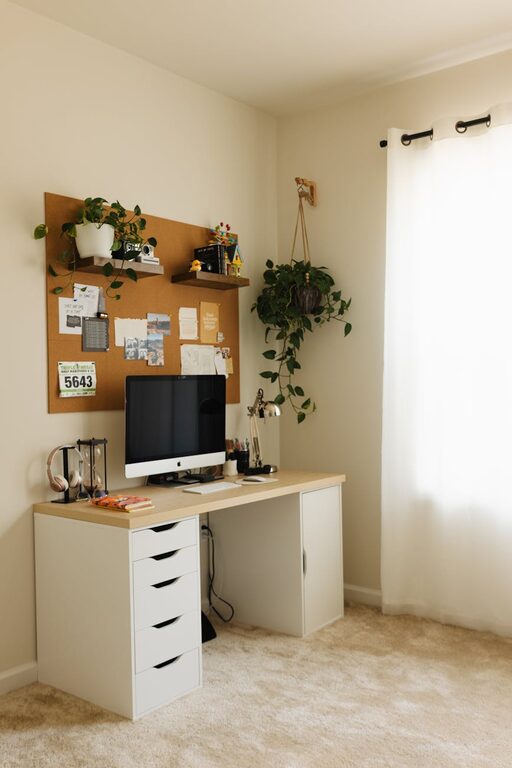
Creating a cozy and functional home office is essential for anyone working or studying from home. A well-designed space can improve focus, reduce stress, and make long hours more enjoyable. Whether you have a dedicated room or a small corner, the right setup can transform your daily routine. Here are some helpful tips to design a home office that balances comfort and practicality.
Choose the Right Location
Finding the ideal spot for your home office is the first step. Consider these factors:
– Natural light: Position your desk near a window if possible. Natural light boosts mood and reduces eye strain.
– Quietness: Select a space away from household noise, like the living room or kitchen, to maintain concentration.
– Space availability: Even a small nook can work. Focus on using vertical space and compact furniture.
Invest in Ergonomic Furniture
Comfort is key when spending hours at a desk. Choose furniture that supports your body and encourages good posture.
– Desk: Opt for a desk with enough surface area for your computer, notebooks, and other essentials. Adjustable desks can be a great way to alternate between sitting and standing.
– Chair: A supportive chair with adjustable height, lumbar support, and comfortable padding helps prevent back pain.
– Accessories: Consider ergonomic keyboard and mouse options to reduce wrist strain.
Organize Efficiently
A cluttered space can distract and frustrate. Keeping your office organized increases productivity.
Use Storage Solutions
– Shelving units or wall-mounted shelves help save floor space and keep books, files, or decorative items tidy.
– Drawer organizers and desk trays separate stationery and small tools.
– Baskets or boxes underneath the desk can hide cables and less-used items.
Manage Cables
Messy cords are unsightly and can be hazardous. Use cable clips, sleeves, or ties to bundle and route cables neatly.
Personalize Your Space
Adding personal touches can make your office feel welcoming and inspire creativity.
– Artwork: Hang prints or photos that you enjoy.
– Plants: Small indoor plants improve air quality and add a natural vibe.
– Lighting: Besides natural light, use warm desk lamps or floor lamps to create a cozy atmosphere in the evenings.
Optimize Lighting Conditions
Lighting affects comfort and productivity. Aim for a layered lighting approach:
– Ambient Lighting: General room lighting to reduce shadows and eye strain.
– Task Lighting: Adjustable desk lamps to illuminate documents or your keyboard.
– Accent Lighting: Optional lights to highlight décor or create mood.
Keep Technology Updated and Efficient
Reliable technology supports seamless work.
– Fast internet connection: Essential for video calls and online collaboration.
– Quality monitor: A larger or multiple monitors can improve workflow.
– Headphones: Noise-canceling headphones help maintain focus in noisy environments.
Maintain a Balance Between Work and Relaxation
Comfort does not mean compromising productivity. Make sure your workspace encourages focus but also provides moments to relax.
– Set clear boundaries for work hours.
– Take regular breaks away from the desk.
– Keep a cozy throw or cushion nearby for comfort during longer working sessions.
Use Colour and Texture Thoughtfully
Colours can influence mood and energy.
– Soft, neutral colours create a calming backdrop.
– Pops of colour in accessories or wall art can energize the space.
– Incorporate different textures, such as wood, fabric, and metal, to add depth and warmth.
Keep Air Quality and Temperature Comfortable
A fresh and comfortable environment supports concentration.
– Ventilate the space regularly to refresh the air.
– Use small fans or heaters as needed to maintain a comfortable temperature.
– Avoid placing your desk directly under air vents to prevent discomfort.
Final Thoughts
Designing a cozy and functional home office is an investment in your well-being and productivity. By focusing on location, ergonomics, organisation, and personal style, you can create a space that motivates and supports you each day. Start with small changes and adjust your setup over time to find what works best for your needs.